
Resolume Bridge
Keep a backup Resolume machine in perfect sync with your main.
From €14.90
View Details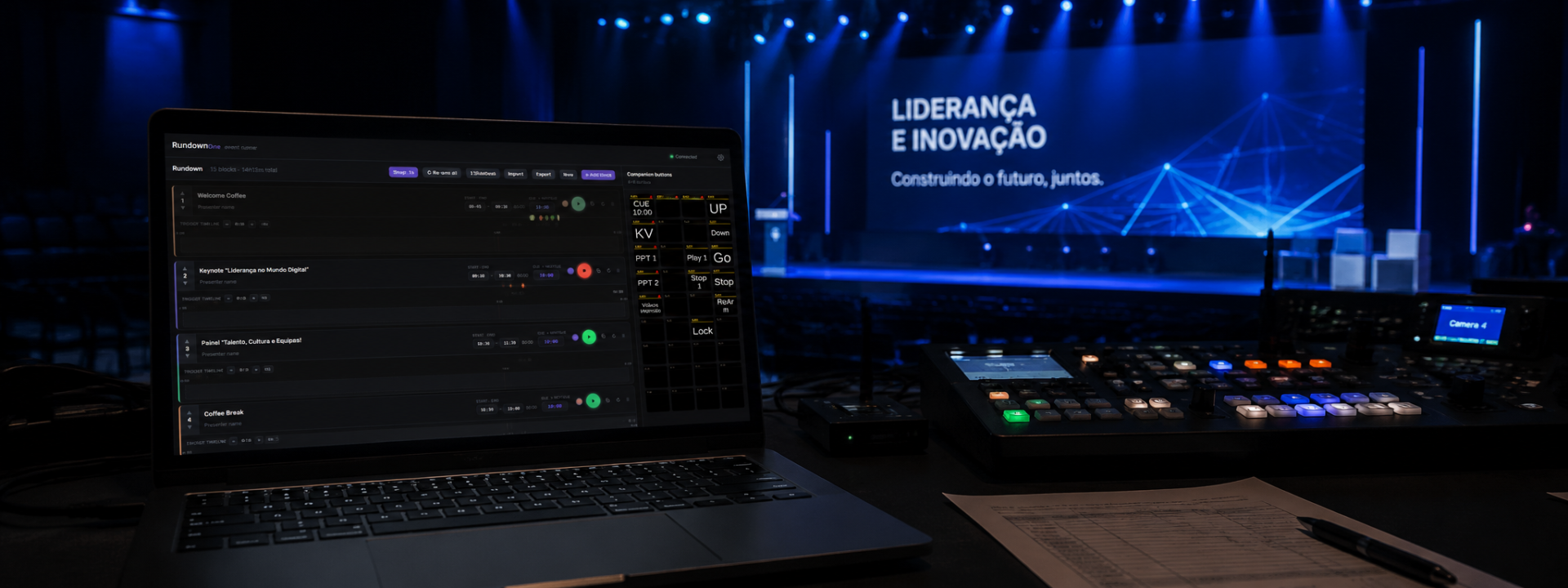
One-button shows. Fire your whole rundown straight to Companion.
From €7.99/mo + VAT · billed annually
RunDownOne turns a show into an ordered list of cue blocks. Each block carries its title, presenter, timing and a drag-and-drop trigger timeline, so the running order on your screen is the running order that fires. Stack blocks, reorder them, insert anywhere, and your show reads cleanly from top to bottom in a control-room dark theme built for the gallery.
The app holds a live view of your Bitfocus Companion surface. Drag buttons straight onto a block's timeline to build the trigger sequence — where you drop a button sets when it fires. There is no scripting and no separate cue language to learn: you sequence the buttons you already built in Companion, visually, on the timeline.
Press Play and the whole block runs. RunDownOne pushes the cue time to Companion and triggers every button on the timeline, on time, so lower-thirds, video rolls, looks and cue timers land together without a stack of manual presses. Auto-advancing selection keeps your place with clear playing, next and done states, plus one-click re-arm when you need to reset a block.
Command blocks let you fire buttons mid-show without a full cue, and Separator lines split a long rundown into clean sections. Smart time entry, snap-to-seconds, colour-coded blocks and duplicate-and-reorder tools keep building fast when the schedule is moving under you.
Run it from front-of-house or hand control to a remote operator: play, next, previous, stop and re-arm are all available over OSC. Shows save to portable .rdo project files, the last show auto-reopens, and SlideDesk import gets existing content in quickly.
RunDownOne installs cleanly on Windows, lives in the system tray and uses simple per-machine licensing with a 30-day offline grace period — so a venue without internet keeps running. Test it against your Companion surface and OSC workflow before you put it in front of an audience.
✓One-button playback fires the whole block: cue time to Companion plus every timeline trigger, on time
✓Live Companion buttons in-app — drag them onto a block's timeline to set the trigger sequence
✓Drop position sets the trigger timing within the block
✓Cue blocks with title, presenter, timing and cue, plus Command blocks and Separator lines
✓Auto-advancing selection with clear playing, next and done states and one-click re-arm
✓Full OSC remote control: play, next, previous, stop and re-arm
✓Smart time entry, snap-to-seconds, colour-coded blocks, duplicate, reorder and insert anywhere
✓Portable .rdo project files with auto-reopen of the last show and SlideDesk import
✓Control-room dark theme with optional light mode
✓Clean Windows install, system-tray operation and per-machine licensing with 30-day offline grace
Prices shown exclude VAT — it is added at checkout. Subscriptions are shown per month but billed annually. Every key activates on the number of machines shown.
Product Launch — save 20%
€9.99 €7.99 /mo
+ VAT at checkout · billed annually (€95.90/yr)
Product Launch −20%One machine — ideal for solo operators, freelancers, and small productions.
€17.90 €14.32 /mo
+ VAT at checkout · billed annually (€171.84/yr)
Product Launch −20%Two machines — run a main and backup system, or prepare on one machine while operating from another.
€34.90 €27.92 /mo
+ VAT at checkout · billed annually (€335.04/yr)
Product Launch −20%Five machines for AV companies, venues, agencies, and technical teams managing multiple shows.
Not sure which licence fits? Each type just sets how many machines a key activates on. See the Terms of Service for the full detail.
RunDownOne is built to drive a Companion surface — it shows your live Companion buttons and triggers them from each block's timeline. You can still build and time a show without Companion, but the one-button trigger workflow depends on a reachable Companion host on your network.
Licensing is per machine. Each install is activated on the workstation it runs on, with a 30-day offline grace period so the application keeps working at venues without reliable internet access.
Yes. Play, next, previous, stop and re-arm are all exposed over OSC, so you can trigger RunDownOne from another control surface, a tablet bridge or a separate operator position on the same network.
Shows save as portable .rdo project files that you can copy between machines and back up. RunDownOne auto-reopens your last show on launch, and you can import existing content via SlideDesk import.
RunDownOne is a Windows application. It installs cleanly on Windows 10 and 11 and runs from the system tray. There is no macOS or Linux build at this time.
Still have a question? Open a support ticket or read the general FAQ.
Keep a backup Resolume machine in perfect sync with your main.
From €14.90
View Details
Two-stage festival timing with role-based screens and NDI output
From €14.99
View Details
Trigger Resolume from timecode.
From €12.00
View Details