
What Screen Lock does
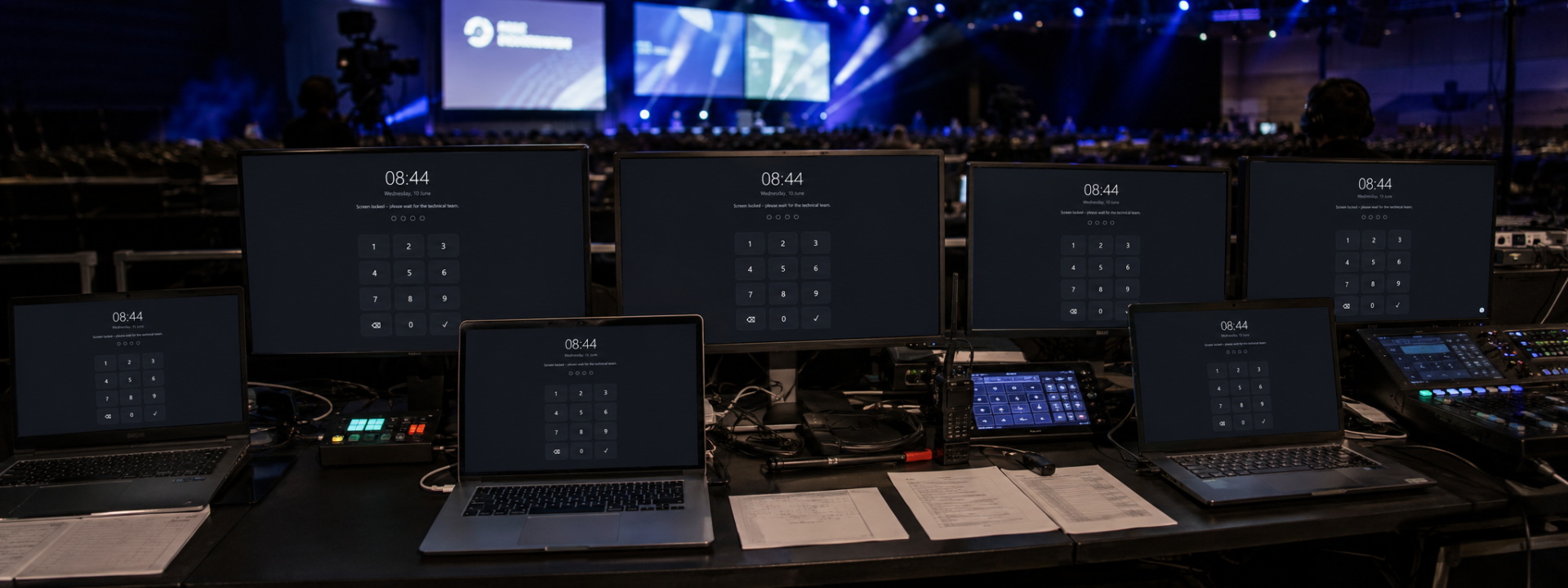
Screen Lock is a dedicated workstation protection tool for live production, broadcast and installation environments where an operator machine must never be touched while it is unattended. During coffee breaks, lunch, rehearsals, venue access windows or overnight standby, it places a full-screen overlay above every running application and keeps critical show-control, playback, presentation and monitoring systems exactly as they were left.
Unlike the standard Windows lock screen, Screen Lock is designed around the realities of a control position. The overlay stays always-on-top across every connected display, blocks the common keyboard and shortcut routes people use to escape back to the desktop, and only releases on a configurable PIN. The main goal is to set a lock on the interface / GUI display and let other connected screens have the full content, whether it's a full-screen PowerPoint presentation or a media server display screen. There is no cloud account and no internet dependency — everything runs locally on the workstation.
The tool fits directly into professional workflows through OSC. Lock and unlock actions can be triggered from a control surface, a Bitfocus Companion button, an automation cue or a show-control timeline, so a stage manager or FOH engineer can secure or release multiple machines without walking to each one. A visual status indicator makes the current lock state unambiguous at a glance.
Branding and messaging are fully configurable. Set custom backgrounds, on-screen text and contact details so a locked machine reads as deliberate and professional rather than crashed or idle — useful in museums, exhibition spaces and front-of-house positions visible to the public.
Screen Lock is lightweight and low-impact by design, leaving headroom for the media servers, players and monitoring software it sits on top of. It can launch automatically with Windows and is touchscreen-friendly, making it practical for kiosk-style and rack-mounted touch panels as well as conventional keyboard-and-mouse positions.
Because it is built for mission-critical use, the priority is predictable, reliable behaviour: lock instantly, hold the screen, and release only when the correct PIN is entered or the authorised OSC command is received. Always test your full lock and unlock workflow before relying on it in production.
Everything in the box
✓Full-screen always-on-top lock overlay
✓PIN-protected unlock with configurable PIN management
✓OSC remote lock and unlock control
✓Blocks common Windows escape methods and shortcuts
✓Multi-monitor support across all connected displays
✓Custom backgrounds, branding and on-screen messages
✓Instant lock activation from key or command
✓Visual lock status indication
✓Touchscreen-friendly interface for kiosks and touch panels
✓Lightweight, low-resource operation with optional auto-start, fully offline
See it in action
We are preparing high-resolution screenshots of Screen Lock. In the meantime, the free trial is the best way to see it for yourself.
What you need to run it
Windows
- Windows 10 or Windows 11 (64-bit)
- Dual-core CPU or better
- 4 GB RAM minimum
- GPU with current display drivers for multi-monitor output
- Local network connectivity for OSC control (no internet required)
Choose your licence
Prices shown exclude VAT — it is added at checkout. Subscriptions are shown per month but billed annually. Every key activates on the number of machines shown.
Product Launch — save 20%
Free tool
Most popularFree
- 1000 machines
- Free updates within the major version
- Email support
Not sure which licence fits? Each type just sets how many machines a key activates on. See the Terms of Service for the full detail.
Questions about Screen Lock
How is this different from the built-in Windows lock?
The Windows lock interrupts running applications and exposes the standard sign-in flow. Screen Lock leaves your show-control, playback and monitoring software running untouched, places a branded always-on-top overlay over them, and blocks the common routes back to the desktop while releasing only on your PIN or an authorised OSC command.
Which OSC commands are supported and what can trigger them?
Screen Lock accepts OSC messages to lock and unlock the workstation. Any OSC-capable source works, including Bitfocus Companion, show-control timelines, automation systems and hardware control surfaces, so you can secure or release machines as part of a cue or from a single button.
Does it work across multiple monitors?
Yes. The overlay covers every connected display so no part of the desktop or running applications is left accessible on a secondary screen.
Does Screen Lock need an internet connection or cloud account?
No. It runs entirely offline and locally on the workstation. OSC control uses your local network only, which suits isolated and air-gapped production networks.
Can it start automatically and lock when the machine boots?
Yes. Screen Lock can launch automatically with Windows so unattended and rack-mounted machines come up protected. We recommend testing your auto-start, PIN and OSC workflow before production use.
Still have a question? Open a support ticket or read the general FAQ.