

AudioCue One
Professional audio cue playback for live shows
From €6.40/mo + VAT · billed annually
What AudioCue One does
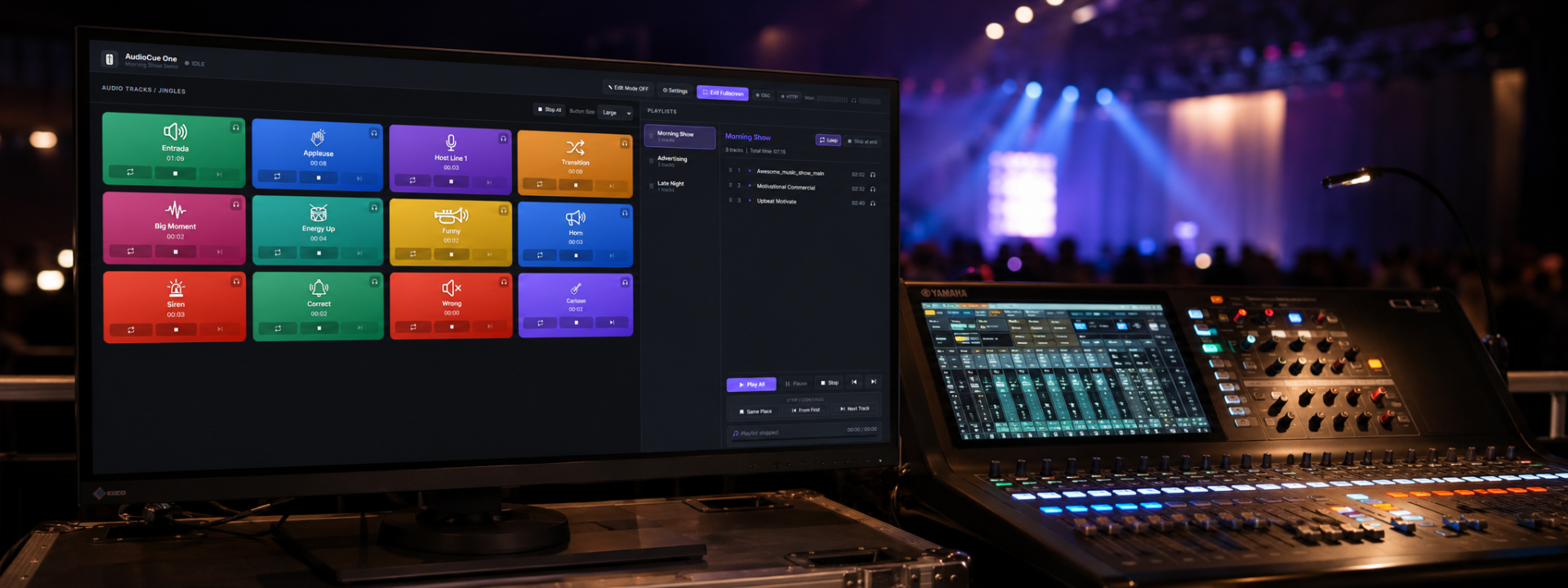
AudioCue One is built for operators who need to fire audio cues instantly and reliably during live productions. The interface centres on a customizable cue button grid where every cue can be named, coloured and sized, giving FOH engineers and show operators a clear, fast layout for high-pressure environments.
The application supports unlimited cues and playlists, with playback modes including loop, stop-at-end and cue chaining. Continue-from-pause and resume-position handling means you can pick up exactly where a track stopped, while fade in, fade out and cue-to-cue automatic transitions keep show audio smooth and professional.
Audio routing is designed around real production needs. A dedicated main output drives the house system while an independent headphone preview output lets operators audition cues privately before sending them live. Multi-output routing distributes cues and playlists to the correct destinations across your interface.
Remote control and integration are handled through OSC and an HTTP REST API, alongside local keyboard shortcuts and touchscreen operation. This makes AudioCue One straightforward to drive from external controllers, automation systems and show-control workflows, with future Companion integration in mind.
Reliability features include Safe Edit Mode locking, confirmation dialogs for critical actions, missing-file detection with warnings, autosave and configuration backup. Projects are stored locally with a simple save and load system, and the software runs fully offline with no cloud dependency.
A low-latency professional audio engine and a responsive modern dark interface round out the package, optimized for both touchscreen and mouse operation. AudioCue One is suited to corporate events, theatre, conferences, broadcast, houses of worship, theme parks, museums, escape rooms and interactive installations.
Everything in the box
✓Instant audio cue triggering from a customizable button grid
✓Unlimited audio cues and playlists
✓Multi-output audio routing with dedicated headphone preview
✓Loop, stop-at-end and cue chaining playback modes
✓Fade in, fade out and cue-to-cue automatic transitions
✓OSC and HTTP REST API remote control
✓Drag-and-drop playlist management and automation
✓Per-cue colour, size and naming customization
✓Safe Edit Mode lock and confirmation dialogs
✓Autosave, configuration backup and missing-file detection
See it in action
Video tutorials
Step-by-step walkthroughs to get the most out of AudioCue One.
What you need to run it
Windows
- Windows 10 or Windows 11 (64-bit)
- Quad-core CPU, 2.0 GHz or faster
- 8 GB RAM (16 GB recommended)
- Dedicated or built-in audio interface with ASIO/WASAPI support for low latency
- Multi-channel audio device recommended for main plus preview outputs
- Local network for OSC/HTTP remote control
- SSD storage recommended for large media libraries
Choose your licence
Prices shown exclude VAT — it is added at checkout. Subscriptions are shown per month but billed annually. Every key activates on the number of machines shown.
Product Launch — save 20%
Personal
€8.00 €6.40 /mo
+ VAT at checkout · billed annually (€76.80/yr)
Product Launch −20%One machine — ideal for solo operators, freelancers, and small events.
- 1 machine
- Updates included while subscribed
- Email support
Professional
Most popular€15.00 €12.00 /mo
+ VAT at checkout · billed annually (€144.00/yr)
Product Launch −20%Two machines — run a main and backup system for live production reliability.
- 2 machines
- Updates included while subscribed
- Email support
Company
€35.00 €28.00 /mo
+ VAT at checkout · billed annually (€336.00/yr)
Product Launch −20%Five machines for production companies, venues, agencies, and technical teams.
- 5 machines
- Updates included while subscribed
- Email support
One machine — pay once and use the current major version permanently.
€200.00 €160.00 one-time
+ VAT at checkout
Product Launch −20%- 1 machine
- Free updates within the major version
- Email support
Not sure which licence fits? Each type just sets how many machines a key activates on. See the Terms of Service for the full detail.
Questions about AudioCue One
Can I preview cues without sending audio to the house system?
Yes. AudioCue One provides a dedicated headphone preview output that is independent of the main output, so you can audition and cue up tracks privately before triggering them live.
How can I control AudioCue One from external systems?
It supports OSC (Open Sound Control) and an HTTP REST API, plus local keyboard shortcuts and touchscreen operation. This lets you integrate it into existing show-control and automation workflows, with future Companion integration in mind.
Does the software require an internet connection?
No. AudioCue One runs fully offline with no cloud dependency. Projects, configuration and backups are stored locally for reliable operation in production environments.
Is there a limit on the number of cues or playlists?
No. You can create unlimited audio cues and playlists, organise them on the cue grid, and manage playlists with drag-and-drop.
What happens if a media file is missing before a show?
AudioCue One includes missing-file detection that warns you when a referenced file cannot be found, so you can resolve issues during setup rather than during the performance.
Still have a question? Open a support ticket or read the general FAQ.