
RunDownOne
One-button shows. Fire your whole rundown straight to Companion.
From €9.99
View Details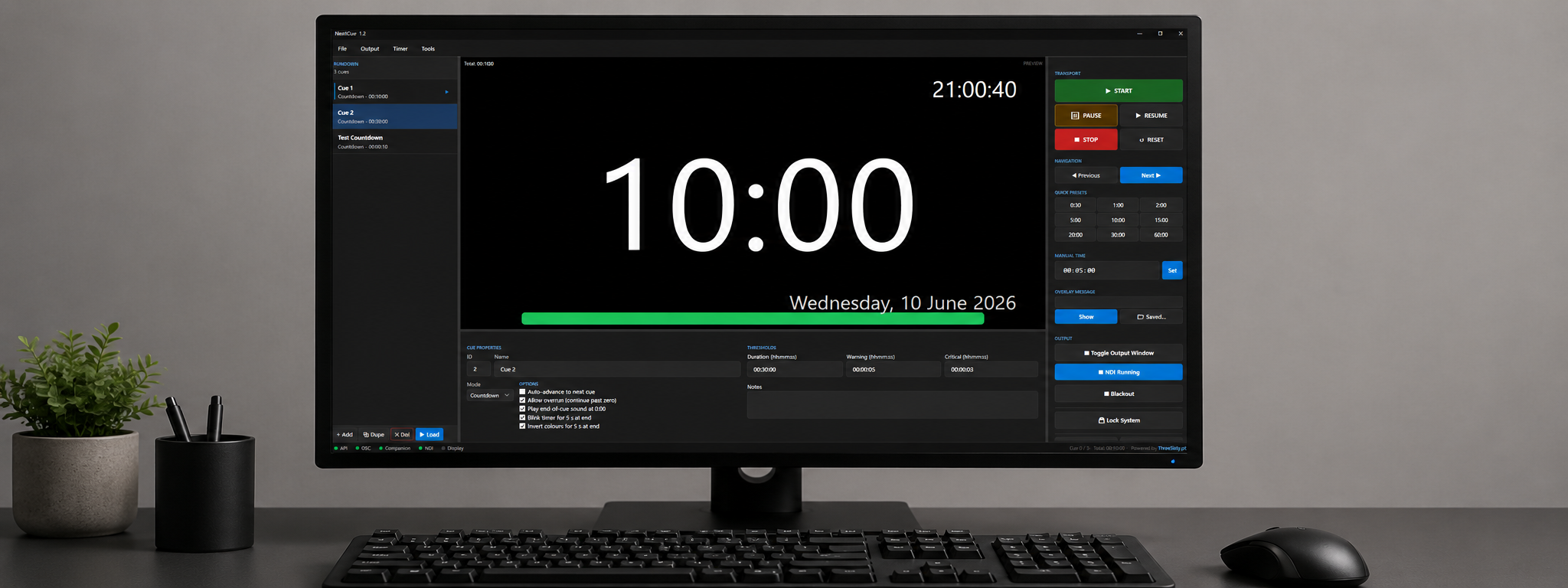

Cue timer & stage timer for live shows
From €4.00/mo + VAT · billed annually
Every live show runs on time — until it does not. NextCue gives conference operators, stage managers and broadcast crews a dependable timing backbone: countdowns, count-ups, time-of-day clocks and complete cue stacks, all driven from one clean operator screen built for fast hands under pressure.
Build your running order as a cue stack with per-cue durations, notes and auto-follow. Fire cues with hotkeys or the numeric pad, nudge time live when a keynote overruns, and let colour thresholds shift the display from green to amber to flashing red as the clock runs out — the universal language every presenter understands without a word being spoken.
Stage displays are first-class citizens. Send a full-screen timer to any physically connected output, or run the free NextCue Viewer on any Windows machine on the LAN: confidence monitors, lectern displays and green-room screens all stay in lockstep, with presenter messaging and attention flash one keypress away.
NextCue speaks the language of your control room. A documented OSC and HTTP API means Bitfocus Companion, Stream Decks and existing show-control rigs can start, pause, reset and adjust timers without anyone touching the operator console — exactly what you need at a FOH position where the timer is one of twenty things you are running.
Built for venues, not for the cloud: NextCue runs entirely offline on a closed show network. No accounts, no sync services, no surprise updates mid-season. The licence is validated once and cached, so a dropped internet uplink never stops the show.
Try the full application free for 14 days, then pick the licence that matches your operation — from a single FOH laptop to a ten-seat company licence covering every venue and rental rack you run.
✓Countdown, count-up and time-of-day clocks — run several timers side by side
✓Cue stacks with per-cue durations, notes and auto-follow
✓Full-screen stage display on any output, plus free LAN viewer clients
✓Presenter messaging with attention flash on every stage display
✓Colour thresholds: green, amber and flashing red as time runs out
✓Live nudge — add or remove time without stopping the clock
✓OSC and HTTP control, ready-made for Bitfocus Companion
✓Hotkey and numeric-pad operation for fast FOH workflows
✓Runs fully offline on closed show networks
✓CSV import of running orders from your production schedule
Step-by-step walkthroughs to get the most out of NextCue.
Prices shown exclude VAT — it is added at checkout. Subscriptions are shown per month but billed annually. Every key activates on the number of machines shown.
Product Launch — save 20%
€5.00 €4.00 /mo
+ VAT at checkout · billed annually (€48.00/yr)
Product Launch −20%One machine — ideal for solo operators, freelancers, and small events.
€9.00 €7.20 /mo
+ VAT at checkout · billed annually (€86.40/yr)
Product Launch −20%Two machines — run a main and a backup, the touring standard.
€19.00 €15.20 /mo
+ VAT at checkout · billed annually (€182.40/yr)
Product Launch −20%Five machines for production companies, venues, agencies, and technical teams.
€150.00 €120.00 one-time
+ VAT at checkout
Product Launch −20%Not sure which licence fits? Each type just sets how many machines a key activates on. See the Terms of Service for the full detail.
Yes. The free NextCue Viewer runs on any Windows machine on the same network and mirrors any timer in full screen. One operator licence drives as many viewers as your LAN can carry.
Completely. Activation needs a brief internet connection once per machine; after that NextCue runs on fully closed show networks and never phones home during a show.
Yes. Every transport action — start, pause, reset, nudge, message, cue advance — is exposed over OSC and a simple HTTP API, so Companion buttons and Stream Decks can drive the whole system.
The display moves through your configured warning colours, can flash red past zero while counting overtime, and you can push a message such as "please wrap up" to every stage display instantly.
The 5 minutes trial is the full application with no feature limits. When you buy, you simply enter your licence key — no reinstall, and your show files carry over.
Still have a question? Open a support ticket or read the general FAQ.
One-button shows. Fire your whole rundown straight to Companion.
From €9.99
View Details
Keep a backup Resolume machine in perfect sync with your main.
From €14.90
View Details
Two-stage festival timing with role-based screens and NDI output
From €14.99
View Details