
SlideDesk
Centralized slide desk and room sync for multi-room conferences
From €10.75
View Details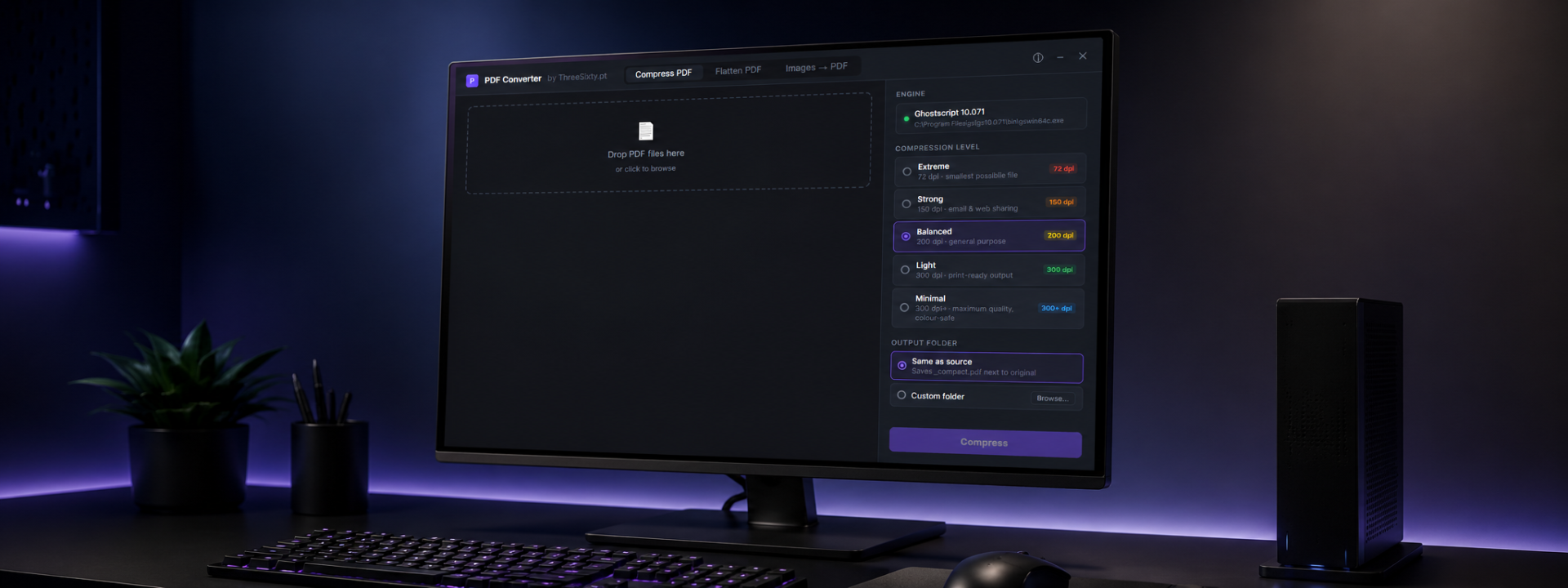
PDF Compact is a no-nonsense Windows utility for technicians who need to prepare PDF documents on-site, on a locked-down show network, or on a machine with no internet access. Everything runs locally: there is no upload step, no account, and no dependency on an external service.
The Compress tool reduces file size using Ghostscript's PDF writer across five quality presets, from screen-optimised for the smallest possible file to prepress for the highest fidelity. It is ideal for trimming oversized slide decks, cue sheets and technical drawings so they load quickly on media servers, presentation machines and shared drives.
The Flatten tool rasterises vector and text pages to a DPI you choose, then rebuilds the PDF. This removes transparency, annotations and layer complexity that can trip up printers, RIPs or older display pipelines — giving you a predictable, single-layer document for printing or long-term archiving.
The Images to PDF tool combines JPG, PNG and other formats (converted via Ghostscript) into a single PDF. You can target standard paper sizes such as A4, A3 and Letter, common screen resolutions like 1080p and 4K, or keep each image's original dimensions. An optional background fill colour keeps mismatched or transparent images looking clean.
Because PDF Compact is a small desktop application, it deploys easily onto FOH laptops, presentation PCs and prep workstations. It is designed to sit alongside your existing playback and presentation tools rather than replace them, handling the file-prep chores that otherwise eat into setup time.
Test it against your own source files before production use. Ghostscript-based processing is deterministic, so once you have a preset that works for a given document type you can rely on repeatable results across your fleet.
✓Compress PDFs at five quality presets from screen to prepress
✓Flatten pages to a chosen DPI to remove transparency and layers
✓Combine JPG, PNG and other images into a single PDF
✓Target A4, A3, Letter, 1080p, 4K or original image dimensions
✓Optional background fill colour for image-to-PDF output
✓Fully offline processing with no cloud upload or account
✓Built on the proven Ghostscript engine for predictable results
✓Lightweight desktop install suitable for FOH and prep machines
✓Batch-friendly image import for multi-page document assembly
✓Deterministic presets for repeatable results across a fleet
Prices shown exclude VAT — it is added at checkout. Subscriptions are shown per month but billed annually. Every key activates on the number of machines shown.
Product Launch — save 20%
Free
Not sure which licence fits? Each type just sets how many machines a key activates on. See the Terms of Service for the full detail.
No. All processing runs locally on your machine. There is no upload step and no account, which makes it suitable for air-gapped or locked-down show networks.
Use screen-optimised for the smallest files where fidelity is less critical, and prepress for the highest quality. The five presets map to Ghostscript's standard PDF writer settings, so test each against your source files to find the right balance.
Flattening rasterises vector and text pages to the DPI you select, then rebuilds the PDF as single-layer image pages. This removes transparency, annotations and layer complexity that can cause issues on printers, RIPs or older display pipelines.
JPG and PNG are supported directly, and other common formats can be converted via the bundled Ghostscript engine. You can size output to standard paper, screen resolutions or the original image dimensions, with an optional background fill colour.
PDF Compact is a Windows desktop application only. There is no macOS or Linux build.
Still have a question? Open a support ticket or read the general FAQ.
Centralized slide desk and room sync for multi-room conferences
From €10.75
View Details
Dual-screen PDF presenter for live events
From €3.25
View Details
Dual-screen presenter control for PDF and Canva, built for live shows
From €5.75
View Details