
PDF Compact
Offline PDF compression, flattening and image-to-PDF for Windows
Free trial available
View Details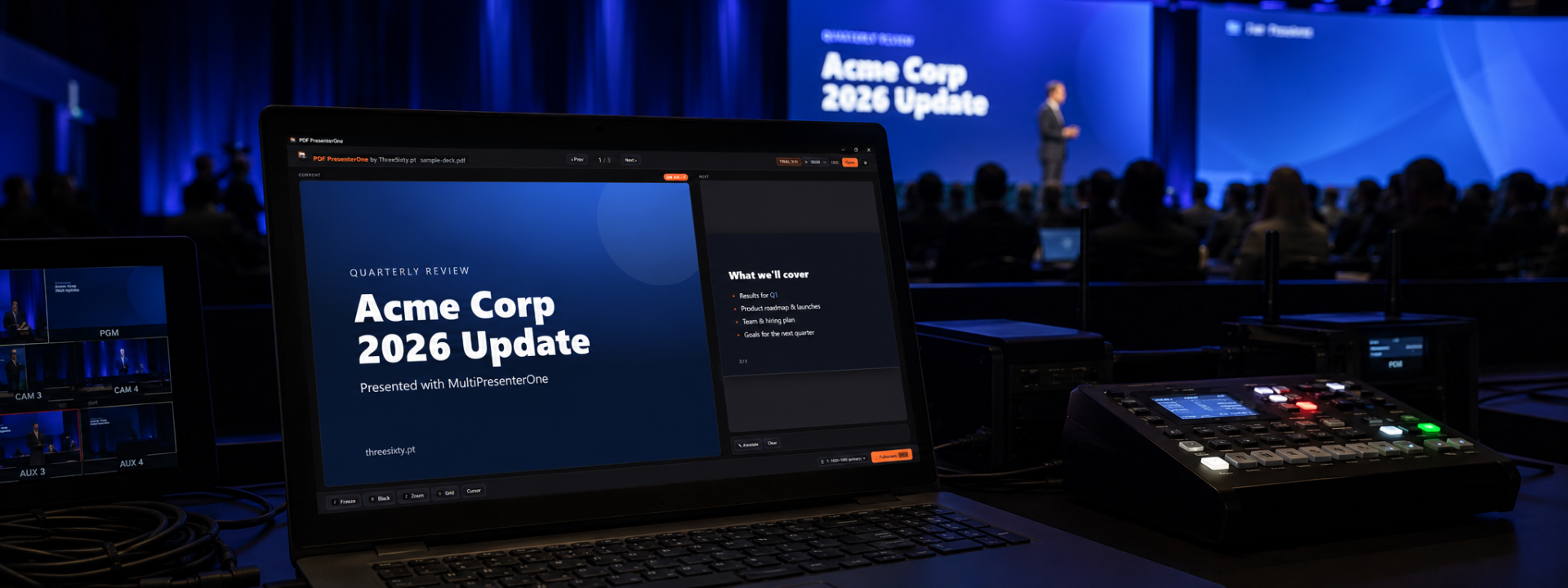
Dual-screen PDF presenter for live events
From €2.60/mo + VAT · billed annually
Conference crews receive PDFs constantly — exported decks, designer-built keynotes, academic papers — and presenting them with a stock PDF reader means visible toolbars, accidental scrolling and a desktop one wrong click away. PDF Presenter delivers PDFs the way PowerPoint delivers slides: full screen, controlled, professional.
It is dual-screen from the ground up. The audience display shows nothing but the current page, pixel-clean at any resolution thanks to native vector rendering. The presenter view shows the current and next slide, speaker notes, an elapsed timer and a slide grid — everything the person at the lectern needs and the audience must never see.
Live tools cover the moments that make operators sweat: freeze the audience output while you navigate privately, black the screen for a stage moment, zoom smoothly into a detail of a technical drawing, or draw and highlight directly on the slide and erase it without a trace.
Control feels familiar instantly. Standard presenter remotes work out of the box, arrow keys behave exactly as presenters expect, and the slide grid jumps non-linearly to any page — question-and-answer sessions stop being a frantic page-down marathon.
PDF Presenter runs on Windows and macOS with the same licence key and works entirely offline — a venue machine with no internet presents just as confidently as your own laptop. Try the full version free for 14 days.
✓Dual-screen: full-screen audience output plus a rich presenter view
✓Presenter view with current and next slide, notes and timer
✓Freeze the audience output while you navigate privately
✓Instant black-out for stage moments
✓Smooth zoom and pan into any slide detail
✓On-screen annotation: draw, highlight, erase
✓Slide grid for instant non-linear jumps
✓Works with standard presenter remotes and hotkeys
✓Crisp native vector rendering at any output resolution
✓Windows and macOS, fully offline
Step-by-step walkthroughs to get the most out of PDF Presenter.
Prices shown exclude VAT — it is added at checkout. Subscriptions are shown per month but billed annually. Every key activates on the number of machines shown.
Product Launch — save 20%
€3.25 €2.60 /mo
+ VAT at checkout · billed annually (€31.20/yr)
Product Launch −20%One machine — perfect for solo presenters, freelancers, and small events.
€6.25 €5.00 /mo
+ VAT at checkout · billed annually (€60.00/yr)
Product Launch −20%Two machines — use one main and one backup computer for safer live operation.
€9.99 €7.99 /mo
+ VAT at checkout · billed annually (€95.90/yr)
Product Launch −20%Five machines for venues, event companies, schools, and production teams.
Not sure which licence fits? Each type just sets how many machines a key activates on. See the Terms of Service for the full detail.
A PDF is the one format that looks identical everywhere: fonts embedded, layout locked, no version surprises on the venue machine. Many crews convert every incoming deck to PDF precisely for that reliability — PDF Presenter makes delivering them feel first-class.
No. Notes, next-slide preview, timer and the slide grid live only on the presenter display. The audience output renders the current page and nothing else.
Yes. Standard remotes send page-up/page-down keystrokes, which map directly to previous and next slide — no configuration needed.
Decks of several hundred pages are routine. Pages are pre-rendered and cached in the background, so navigation stays instant even in heavy, graphics-rich documents.
Yes — keys work on Windows and macOS alike, and only the number of activated machines counts against your seats.
Still have a question? Open a support ticket or read the general FAQ.
Offline PDF compression, flattening and image-to-PDF for Windows
Free trial available
View Details
Centralized slide desk and room sync for multi-room conferences
From €10.75
View Details
Dual-screen presenter control for PDF and Canva, built for live shows
From €5.75
View Details