
RunDownOne
One-button shows. Fire your whole rundown straight to Companion.
From €9.99
View Details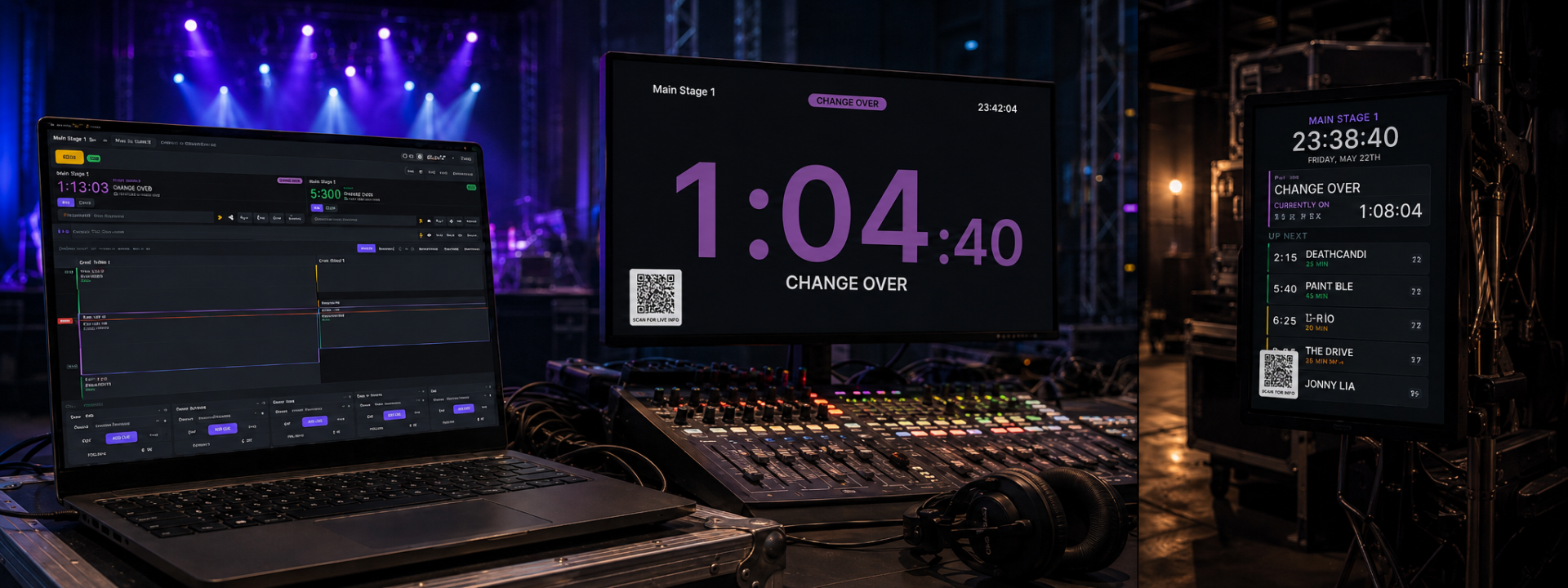
Two-stage festival timing with role-based screens and NDI output
From €11.99/mo + VAT · billed annually
MultiStage Timer is a desktop control console built for events that run two stages in parallel. From one operator position you drive two independent timer engines and four role-based full-screen outputs, each tailored to the people watching it. Technical crews get a large landscape countdown showing the current event's remaining time and what is coming up next; performers waiting backstage get a portrait clock with a clear "next events" list.
The heart of the app is the schedule editor. You build each day's rundown with start and end times, event types, acts or sessions, colours and notes. Rundowns import from and export to the festival's HORÁRIOS Excel sheets, so the schedule your production office already maintains becomes the live source of truth without re-keying.
Event types are user-defined and drawn from a curated colour palette with a custom picker, and any change propagates to every output instantly. Both the tech and backstage layouts are fully editable: drag elements to move them, corner-resize each item, snap to a grid and confirm everything against a live preview before it hits the wall.
Every screen can be published as a clean 1920x1080 25fps NDI feed for use with NDI-to-HDMI converters, and portrait backstage content is automatically rotated into a landscape frame so it maps cleanly onto standard displays and converters. This keeps cabling simple on large sites where displays are far from the operator.
For crews and artists who are not near a screen, each stage can be published online via a lightweight PHP and MySQL backend using a per-computer key and no login. Anyone scanning the on-screen QR code with a phone or tablet gets a live mobile mirror of that stage's timer. A guided tutorial mode in English and Portuguese walks new operators through every option.
MultiStage Timer is hardened for long show days: software rendering and crash guards keep outputs reliable across multi-day festival operation on typical show hardware. Test it against your own rundown and display chain before production use.
✓Two independent timer engines from one control console
✓Four role-based full-screen outputs: tech and backstage per stage
✓Landscape tech countdown with current and upcoming events
✓Portrait backstage clock with a live next-events list
✓Schedule editor with import/export to HORÁRIOS Excel sheets
✓User-defined event types with curated palette and custom colour picker
✓Free-form layout editors with drag, corner-resize, snap-to-grid and live preview
✓Clean 1920x1080 25fps NDI output per screen, with portrait auto-rotation
✓Online stage sharing with QR code and per-computer key, no login required
✓Guided tutorial mode in English and Portuguese
Step-by-step walkthroughs to get the most out of MultiStage Timer.
Prices shown exclude VAT — it is added at checkout. Subscriptions are shown per month but billed annually. Every key activates on the number of machines shown.
Product Launch — save 20%
€14.99 €11.99 /mo
+ VAT at checkout · billed annually (€143.90/yr)
Product Launch −20%One machine — Full pro power, always up to date.
€449.00 €359.20 one-time
+ VAT at checkout
Product Launch −20%One machine — Pay once, run every show forever.
Not sure which licence fits? Each type just sets how many machines a key activates on. See the Terms of Service for the full detail.
You can do either. Each of the four screens can drive a physical display directly, or be published as a clean 1920x1080 25fps NDI feed for use with NDI-to-HDMI converters. Portrait backstage content is auto-rotated into a landscape frame so it maps cleanly to converters.
You build rundowns in the built-in schedule editor, or import directly from the festival's HORÁRIOS Excel sheets. You can also export back to Excel, so the production office keeps a single source of truth.
Each stage can be published online through a lightweight PHP and MySQL backend using a per-computer key. There is no login: crew and artists scan the QR code shown on screen and get a live mobile mirror of that stage's timer.
Yes. The tech and backstage outputs have free-form layout editors — drag to move, corner-resize every element and snap to grid, with a live preview. Event types use a curated colour palette plus a custom picker, and colour changes propagate everywhere instantly.
It is built for long-run operation with software rendering and crash guards to keep outputs stable on typical show hardware. As with any show tool, test it against your own rundown, network and display chain before production use.
Still have a question? Open a support ticket or read the general FAQ.
One-button shows. Fire your whole rundown straight to Companion.
From €9.99
View Details
Keep a backup Resolume machine in perfect sync with your main.
From €14.90
View Details
Trigger Resolume from timecode.
From €12.00
View Details