
RunDownOne
One-button shows. Fire your whole rundown straight to Companion.
From €9.99
View Details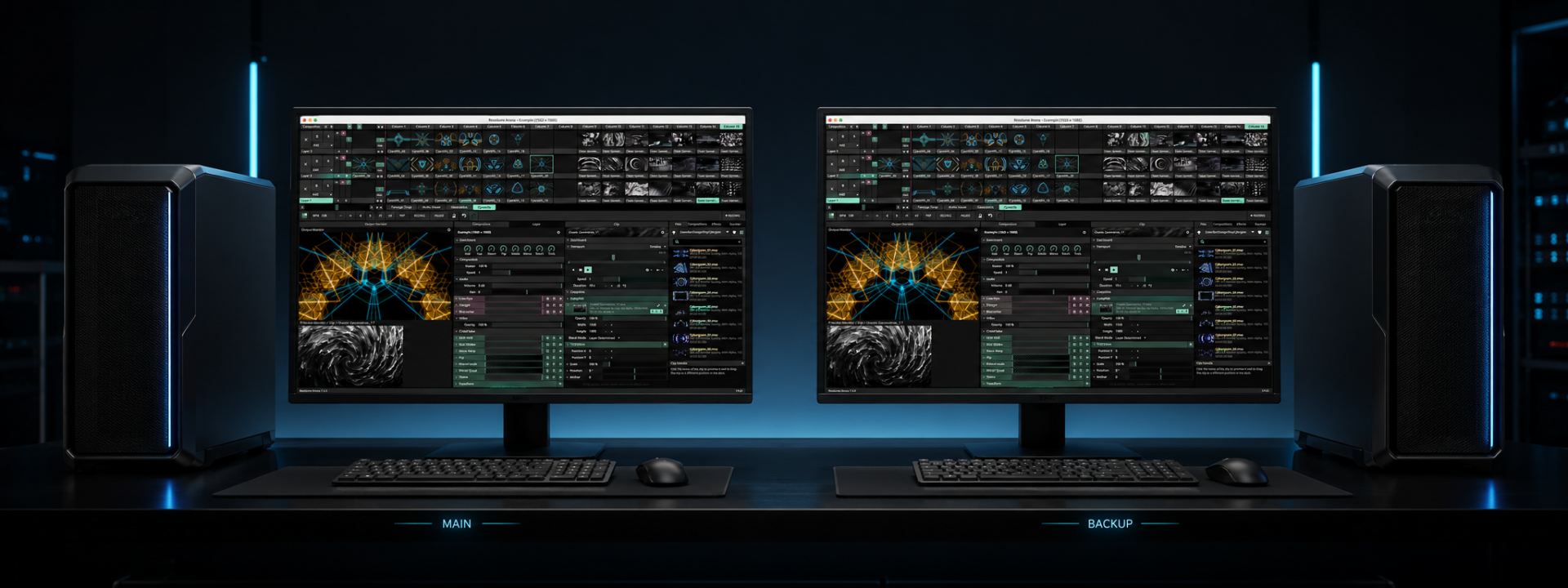

Keep a backup Resolume machine in perfect sync with your main.
From €11.92/mo + VAT · billed annually
Resolume Bridge solves the recurring problem of running a redundant media server: keeping a backup machine genuinely ready to take over. Instead of manually copying compositions, chasing missing media and re-creating your screen setup, Bridge packages the whole show and delivers it to the spare with a single press.
Save & Sync saves the current composition in Resolume, re-scans it for every clip in use, and pushes the project, all referenced media and your Advanced Output configuration to the backup over a single wired TCP link. Missing files are flagged before transfer so problems surface in prep, not during the show. When the transfer completes, the backup opens the received project in its own Resolume automatically — nobody has to touch the spare machine.
Bridge handles paths intelligently. You can collect all media into a single backup folder with the project rewritten to match, or mirror an identical drive layout on both machines one-to-one. Either way, the composition that lands on the backup points at real files, not broken links.
During the performance, live OSC mirroring replays every clip you trigger, every fader you move and every effect change on the backup in real time. Choose frame-accurate tracking, where backup clips follow the main machine's playhead frame by frame, or free-running, where clips fire and play on their own clock. If the main fails, you switch to a spare that is already at the same point in the show.
Transfers are built to survive a live network. Files are written to temporary names and only swapped into place once they are complete, so a dropped cable or interrupted copy never leaves a half-written clip behind. A live progress view shows transfer speed and status throughout.
Licensing is deliberately simple: one license covers your main computer. The backup application is free and can be installed on as many spare machines as you keep on the shelf, so redundancy never costs you per node.
✓One-button Save & Sync from composition to fully loaded backup
✓Automatic media detection with missing-file warnings before transfer
✓Advanced Output presets and active screen setup travel with the show
✓Smart path handling: collect to one folder or mirror identical drive layouts
✓Backup opens the received project automatically, ready to play
✓Live show mirroring of clip triggers, faders and effects over OSC
✓Frame-accurate playhead tracking or free-running clip playback
✓Atomic transfers using temporary files swapped in only when complete
✓Single wired-gigabit TCP link with live progress and speed readout
✓Free backup app on unlimited spare machines; license the main only
Step-by-step walkthroughs to get the most out of Resolume Bridge.
Prices shown exclude VAT — it is added at checkout. Subscriptions are shown per month but billed annually. Every key activates on the number of machines shown.
Product Launch — save 20%
€14.90 €11.92 /mo
+ VAT at checkout · billed annually (€143.04/yr)
Product Launch −20%Two machines — run a main and backup system for live production reliability.
€399.00 €319.20 one-time
+ VAT at checkout
Product Launch −20%Two machines — run a main and a backup, the touring standard.
Not sure which licence fits? Each type just sets how many machines a key activates on. See the Terms of Service for the full detail.
No. One license covers your main computer. The backup application is free and can be installed on as many spare machines as you keep, so adding redundancy carries no extra per-node cost.
Yes. Bridge mirrors clip triggers, faders and effect changes over OSC in real time. You can run frame-accurate, where backup clips track the main's playhead frame by frame, or free-running, where clips fire on their own clock.
Files are written under temporary names and only swapped into place once fully received. An interrupted transfer never leaves a partial or corrupt clip on the backup — you simply re-run the sync.
Yes. Screen-setup presets travel with the show and the active output configuration loads with the composition on the backup, so the spare is configured for your screens, not just your media.
You choose. Collect all media into a single backup folder with the project rewritten to match it, or mirror an identical drive layout one-to-one. Either mode guarantees the backup project points at valid files.
Still have a question? Open a support ticket or read the general FAQ.
One-button shows. Fire your whole rundown straight to Companion.
From €9.99
View Details
Two-stage festival timing with role-based screens and NDI output
From €14.99
View Details
Trigger Resolume from timecode.
From €12.00
View Details