
RunDownOne
One-button shows. Fire your whole rundown straight to Companion.
From €9.99
View Details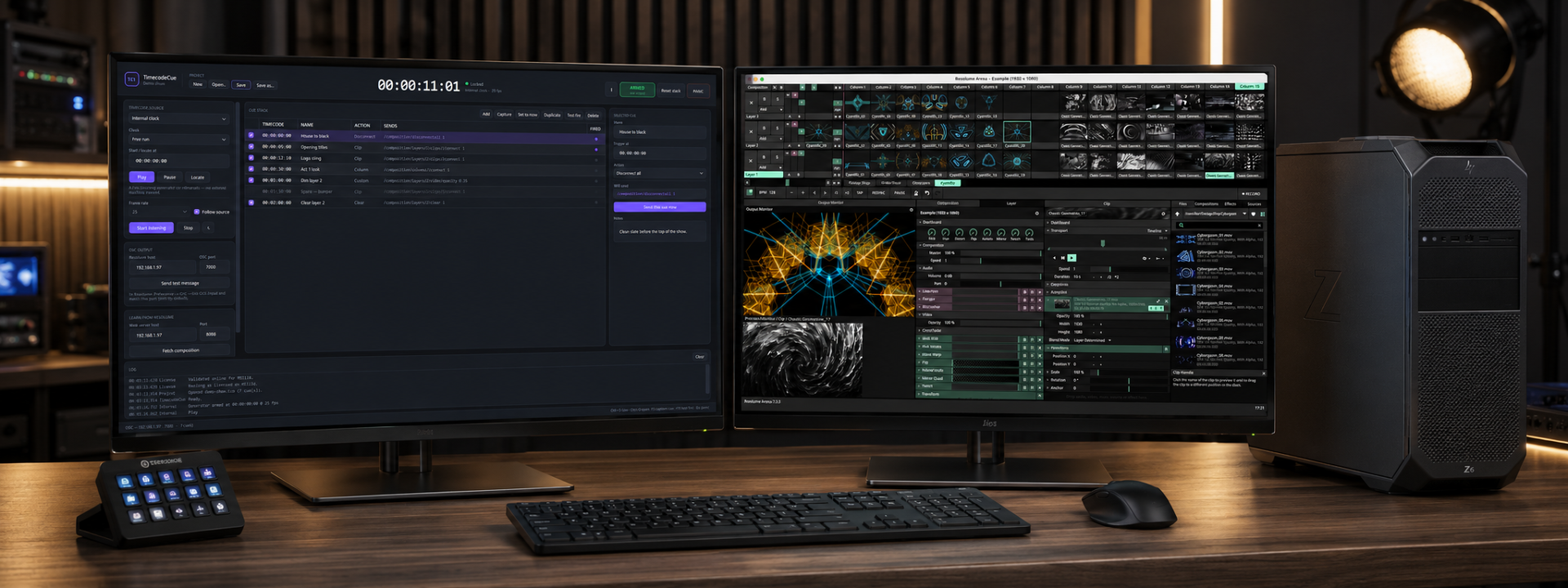

TimecodeCue turns the timecode that is already running your show into a reliable trigger source for Resolume. Instead of an operator hovering over a keyboard waiting for the moment, you program the cues once against frame values, arm the stack, and let the clock fire clips, columns and OSC messages at the exact frames you chose.
It reads the timecode you already have. LTC comes off any audio input and locks to 24, 25, 29.97 drop and non-drop, and 30 fps on its own at any sample rate. MTC arrives over MIDI and follows both the running clock and locates. Art-Net timecode can come from a lighting or media console. For rehearsals there is an internal generator that runs free-run or time of day.
Cues are built to survive a real show. A cue still fires if a single frame is dropped, and scrubbing or relocating re-arms the stack silently rather than machine-gunning every cue it skipped over. Beyond triggering clips and columns, you can clear a layer, disconnect everything, or send any OSC address with typed arguments. An ARM/DISARM master and a PANIC button that blacks the composition instantly keep control where it belongs.
Programming is quick. Learn from Resolume pulls the live composition so layers and clips appear by their real names. You can capture the timecode showing right now straight into a cue, and type frame values plainly: 100 for one second, 13500 for a minute thirty-five, with one click to select the whole field. Any cue can be test-fired without waiting for the clock.
Projects save as .tco files with the usual New, Open, Save and Save As. A live log records every cue sent along with the timecode it went out on, and an input meter, lock status and detected frame rate stay visible at all times. The interface is dark, legible at a glance, and designed for a control room.
TimecodeCue ships as a single self-contained executable with no runtime to install. It is licensed per computer, validates offline for 30 days between checks, and includes a five-minute built-in trial so you can test it against your rig before production.
✓LTC decoding off any audio input, auto-locking to 24, 25, 29.97 drop/non-drop and 30 fps
✓MTC over MIDI following both the running clock and locates
✓Art-Net timecode input from lighting or media consoles
✓Internal generator for rehearsals in free-run or time of day
✓Fires clips, columns, layer clears, disconnects or any typed OSC address
✓Cues still fire when a frame is dropped
✓Silent re-arm on scrub or relocate instead of firing skipped cues
✓ARM/DISARM master plus a PANIC button that blacks the composition
✓Learn from Resolume pulls layer and clip names from the live composition
✓Capture current timecode into a cue and test-fire without the clock
Prices shown exclude VAT — it is added at checkout. Subscriptions are shown per month but billed annually. Every key activates on the number of machines shown.
Product Launch — save 20%
€12.00 €9.60 /mo
+ VAT at checkout · billed annually (€115.20/yr)
Product Launch −20%One machine — ideal for solo operators, freelancers, and small events.
€19.00 €15.20 /mo
+ VAT at checkout · billed annually (€182.40/yr)
Product Launch −20%Two machines — run a main and a backup, the touring standard.
€299.00 €239.20 one-time
+ VAT at checkout
Product Launch −20%One machine — ideal for solo operators, freelancers, and small events.
Not sure which licence fits? Each type just sets how many machines a key activates on. See the Terms of Service for the full detail.
It is licensed per computer. The license validates online periodically but runs up to 30 days offline between validations, which suits isolated show networks. A five-minute trial is built in so you can test before purchase.
Resolume Arena or Avenue with OSC input enabled. The optional Learn from Resolume feature, which pulls layer and clip names from the live composition, requires Resolume's web server to be turned on.
A cue fires even if its exact frame is dropped, so you do not lose triggers to jitter. If you scrub or relocate, the cue stack re-arms silently rather than firing every cue it passed over.
LTC off any audio input, MTC over MIDI, and Art-Net timecode from a console. LTC locks automatically to 24, 25, 29.97 drop and non-drop, and 30 fps at any sample rate. An internal generator covers rehearsals in free-run or time of day.
Yes. You can trigger clips and columns, clear a layer, disconnect everything, or send any OSC address with typed arguments, giving you full reach into anything Resolume exposes over OSC.
Still have a question? Open a support ticket or read the general FAQ.
One-button shows. Fire your whole rundown straight to Companion.
From €9.99
View Details
Keep a backup Resolume machine in perfect sync with your main.
From €14.90
View Details
Two-stage festival timing with role-based screens and NDI output
From €14.99
View Details