
PDF Compact
Offline PDF compression, flattening and image-to-PDF for Windows
Free trial available
View Details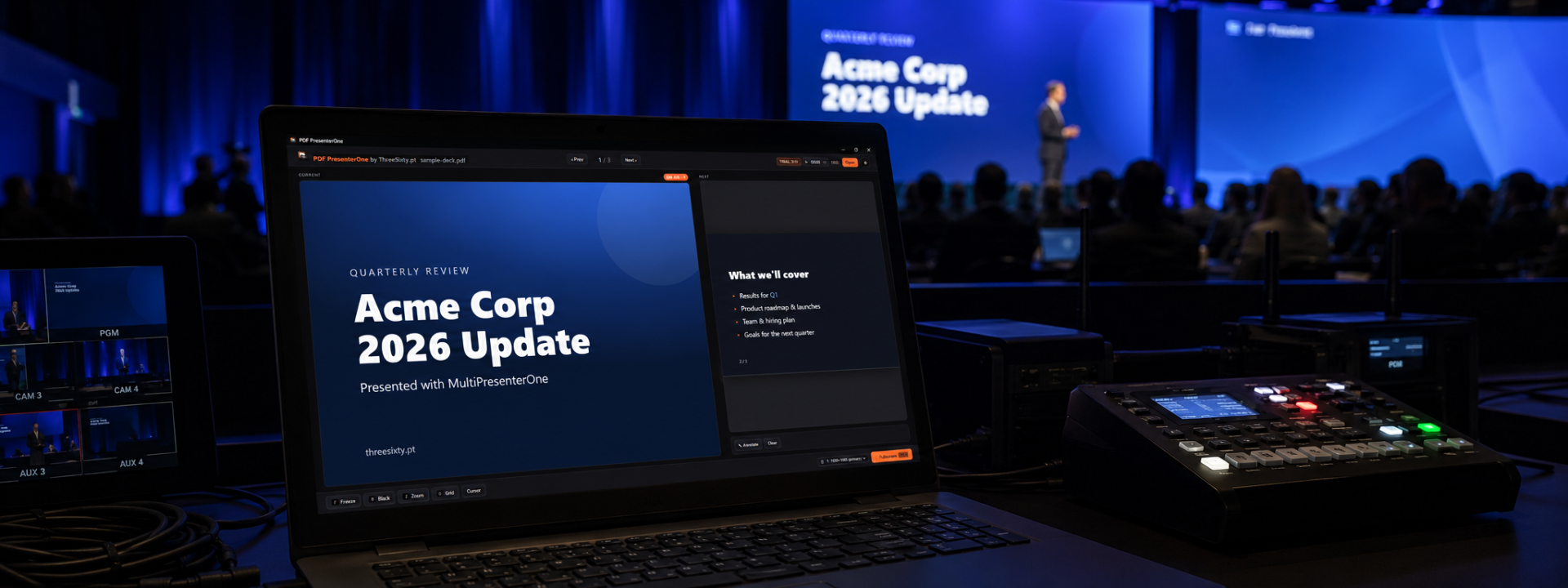
Dual-screen presenter control for PDF and Canva, built for live shows
From €4.60/mo + VAT · billed annually
MultiPresenter One gives presentation operators the control and confidence of a dedicated show-control system without the complexity of a full media server. It runs on your laptop or control computer and drives a second display — projector, LED wall, or external monitor — while keeping a full presenter view in front of you.
The application opens native PDF files directly, with no upload, conversion, or signup, so document-based presentations stay local and reliable. It also loads and presents Canva online presentations, letting you run modern, design-led decks without first exporting them to PowerPoint.
In dual-screen presenter mode the audience sees only a clean fullscreen output, while the operator works with the current slide, the next slide, and a thumbnail strip. You always know what is on-air and what comes next, which matters when a presenter goes off-script or jumps ahead.
Live operation tools are built in. Freeze the audience output to hold the current slide while you navigate privately, flash instantly to black or a blank slide, zoom into technical drawings and diagrams, and switch to a grid view to jump directly to any slide — with the on-air slide clearly marked by an ember outline.
Audience-side annotation lets you draw over the output with pen or highlighter tools and clear everything with one click, ideal for emphasising detail during technical or educational sessions. A full hotkey set keeps navigation, freeze, zoom, grid, and flash within reach for fast, eyes-up operation.
The interface is dark-mode friendly and optimised for control booths, backstage positions, and dark conference rooms where speed and reliability matter. Test it in your own setup before production to confirm display routing and hotkey workflow.
✓Open native PDF files locally with no upload or conversion
✓Load and present Canva online presentations directly
✓Dual-screen presenter view with clean fullscreen audience output
✓Current slide, next slide, and thumbnail previews
✓Freeze audience output while you navigate privately
✓Flash to black or blank slide instantly
✓Zoom into diagrams, drawings, and document detail
✓Grid slide view with ember outline on the on-air slide
✓Audience-side pen and highlighter annotation with one-click clear
✓Full hotkey control for live, eyes-up operation
We are preparing high-resolution screenshots of MultiPresenter One. In the meantime, the free trial is the best way to see it for yourself.
Prices shown exclude VAT — it is added at checkout. Subscriptions are shown per month but billed annually. Every key activates on the number of machines shown.
Product Launch — save 20%
€5.75 €4.60 /mo
+ VAT at checkout · billed annually (€55.20/yr)
Product Launch −20%One machine — perfect for solo presenters, freelancers, and small events.
€11.60 €9.28 /mo
+ VAT at checkout · billed annually (€111.36/yr)
Product Launch −20%Two machines — run a main and backup system for live production reliability.
€20.75 €16.60 /mo
+ VAT at checkout · billed annually (€199.20/yr)
Product Launch −20%Five machines for production companies, venues, agencies, and technical teams.
Not sure which licence fits? Each type just sets how many machines a key activates on. See the Terms of Service for the full detail.
Only for Canva presentations, which load from Canva online. PDF files open and present entirely locally with no upload, conversion, or signup, so they work offline in any venue.
Connect a second display to your control computer as an extended desktop. MultiPresenter One sends a clean fullscreen output to that display while keeping the presenter view, with current and next slide previews, on your main screen.
MultiPresenter One is designed primarily for direct operator use with its built-in hotkeys. Test your specific control workflow before production to confirm it fits your show.
Yes. Freeze holds the current slide on the audience output while you navigate, preview upcoming slides, or use the grid view privately in the presenter view.
Native PDF files and Canva online presentations. PowerPoint files are not required and PDFs do not need to be converted before presenting.
Still have a question? Open a support ticket or read the general FAQ.
Offline PDF compression, flattening and image-to-PDF for Windows
Free trial available
View Details
Centralized slide desk and room sync for multi-room conferences
From €10.75
View Details
Dual-screen PDF presenter for live events
From €3.25
View Details